Getting subtitles right in your marketing videos isn't just a nice-to-have—it's essential if you want to keep viewers glued to the screen, especially when you're reaching out across borders. We've all seen those clunky translations that make you cringe and hit pause, or worse, skip altogether. And the numbers back this up: without proper captions, engagement can tank by as much as 40%, while adding them boosts watch time significantly, with folks 80% more likely to stick around till the end. Non-native speakers, in particular, face real barriers, turning what should be an accessible pitch into a frustrating puzzle. So, let's dig into the nuts and bolts—starting with timing, moving to those tricky cultural bits, and wrapping up with tools that actually make the job easier. I'll throw in some real examples along the way to show what works and what flops.
Getting the Timing Spot-On: Why It Feels Like Magic When Done Right
You know that moment when subtitles pop up just as the speaker starts talking, but not so early that it spoils the surprise? That's the sweet spot. Mess it up, and viewers get distracted—maybe they read ahead or lag behind, and poof, they're gone. Studies from places like Meta highlight how captioned content can hike view times by 12%, but only if the sync is seamless. A good rule of thumb? Keep each subtitle on screen for about 3 to 7 seconds, maxing out at two lines and around 40 characters per line to avoid overwhelming the eye.
Picture a high-energy ad for a new app. If the subtitles drag even a second behind the narrator's hype, mobile users—who watch 92% of videos silently—might miss the call to action entirely. I've found testing on different screens helps a ton; what looks perfect on a desktop might feel rushed on a phone. Tools that let you preview timings in real-time are lifesavers here.
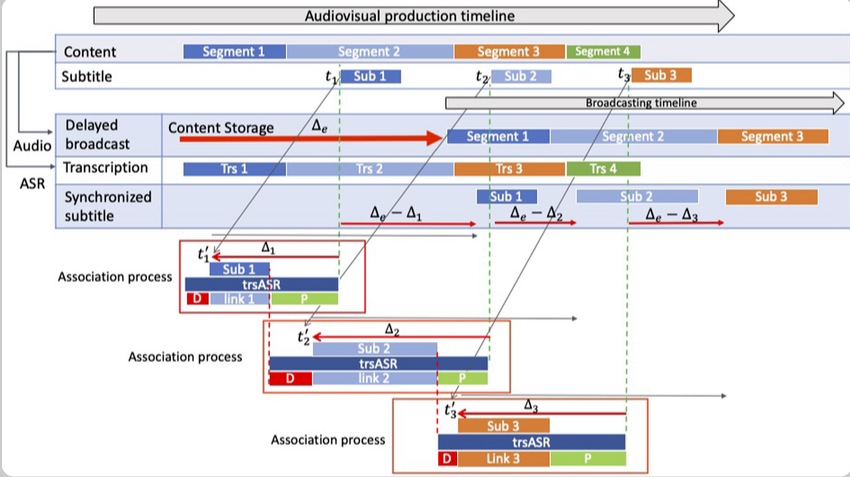
For a hands-on look, here's a solid YouTube clip that walks through timing tweaks—it's straightforward and shows before-and-after differences that really drive the point home: Subtitle Timing Basics. And to visualize it better, check out this diagram of how subtitles align with audio tracks.
Tackling Cultural Twists: When Words Mean More Than You Think
Straight-up word-for-word translations? They're a recipe for disaster, especially with stuff like jokes or idioms that don't cross cultures smoothly. Take humor—something funny in English might land flat or even offend elsewhere because of hidden meanings. For example, that classic Pepsi blunder in China: their "Come alive with the Pepsi Generation" slogan got twisted into "Pepsi brings your ancestors back from the grave," which didn't exactly scream refreshment. Brands that skip cultural checks can see engagement dip by 25% or more, per localization reports.
It's all about localization, really—tweaking the message so it feels local without losing the core idea. Netflix nails this by hiring folks who get regional vibes, leading to better retention globally. In one Arabic drama, the word "wallah" (like "I swear" but loaded with emphasis) needed careful handling to keep the sarcasm or sincerity intact, or it'd confuse everyone. Watch out for symbols too; red might mean energy in one place but warning in another.
Ever heard of the American Airlines mix-up? Their "Fly in Leather" campaign translated to "Fly Naked" in parts of Mexico—talk about unintended excitement! For a quick laugh (and lesson), peek at this video compilation of ad fails: Epic Translation Fails. Here's an image capturing some of those awkward moments in ads.

Picking the Right Tools: Making the Process Less of a Grind
No one wants to spend hours fiddling with subtitles manually, right? That's where smart tools come in, blending AI smarts with human tweaks for accuracy. In 2025, options like Kapwing stand out for their all-in-one editing and translation, handling over 100 languages with solid results—think 85% accuracy on the first pass. They auto-translate and let you fine-tune for those cultural gotchas we just talked about.
Maestra AI is another gem, especially for live stuff, supporting 125+ languages and integrating dubbing too. Teams on a budget might lean toward freebies like Subtitle Edit, which keeps timings intact across formats. Overall, blending AI with expert reviews can cut production time by half while keeping quality high.
To help you sort through them, here's a breakdown:
| Tool Name | Standout Features | Ideal For | Language Support |
|---|---|---|---|
| Kapwing | AI editing, dubbing, effects | Creative marketing teams | 100+ |
| Maestra AI | Real-time translation, auto-subs | Live events and ads | 125+ |
| Immersive Translate | Browser-based, long videos | Quick browser workflows | Varies, strong in Asian languages |
| Checksub | Dubbing and subtitle focus | Professional dubbing needs | 200+ |
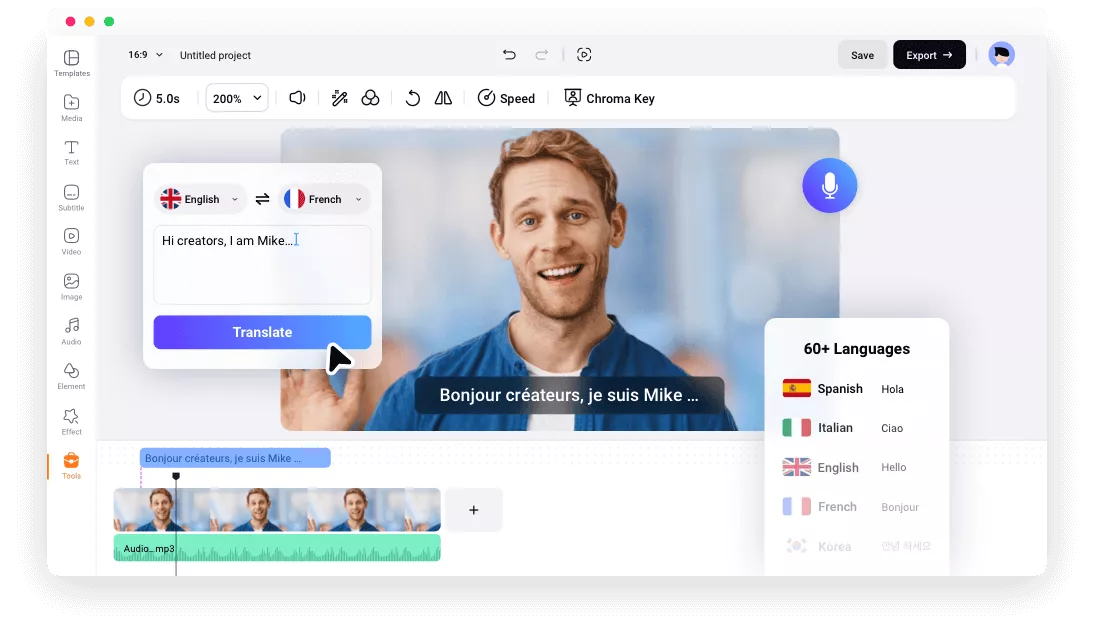
These setups tackle accessibility head-on; viewers report 38% better recall with well-done transcripts. See one in action with this interface shot from a popular tool.
Pulling all this together—sharp timing, cultural savvy, and reliable tools—turns your videos into global winners that connect rather than confuse. If you're building a team or scaling up, partnering with specialists can make a world of difference. Take Artlangs Translation, for instance; they've been at this for years, mastering over 230 languages with a focus on video localization, short drama subtitles, game adaptations, multilingual dubbing for audiobooks, and even data annotation. Their track record of successful cases brings that extra layer of experience to ensure your campaigns hit the mark every time.